리눅스에서 smartmontools로 디스크 상태를 확인하는 방법은 무엇인가요?
💡 요약 정리
- Hard disk 장애는 정기적인 Disk 상태점검을 통하여 방지할 수 있습니다
- smartmontools는 오픈소스 디스크 상태 점검 툴입니다
- yum install smartmontools로 설치 후 smartctl 명령으로 SMART 정보를 확인합니다
- SMART Error Log 버전 갯수가 1천개 이상인 경우 하드디스크 교체 권장
- Dell 서버는 megaraid 옵션으로 RAID 상태 및 디스크 상태 확인 가능
리눅스 서버를 운영하다보면 Hard Disk 장애문제로 심각한 상황에 빠질때가 있습니다 Hard disk 장애는 정기적인 Disk 상태점검을 통하여 방지할수 있습니다. 리눅스 서버에서는 오픈소스 smartmontools 툴을 이용하여 디스크 상태를 점검할수 있습니다
smartmontools 공식 홈페이지 : http://www.smartmontools.org
1. 설치
[root@localhost src]# yum -y install smartmontools

Resolving Dependencies
--> Running transaction check
---> Package smartmontools.x86_64 1:5.42-2.el5 set to be updated
--> Finished Dependency Resolution

Dependencies Resolved

================================================================================
 Package               Arch           Version                Repository    Size
================================================================================
Updating:
 smartmontools         x86_64         1:5.42-2.el5           base         517 k

Transaction Summary
================================================================================
Install       0 Package(s)
Upgrade       1 Package(s)

Total download size: 517 k
Is this ok [y/N]: y
Downloading Packages:
smartmontools-5.42-2.el5.x86_64.rpm                       | 517 kB     00:00
Running rpm_check_debug
Running Transaction Test
Finished Transaction Test
Transaction Test Succeeded
Running Transaction
  Updating       : smartmontools                                            1/2
  Cleanup        : smartmontools                                            2/2

Updated:
  smartmontools.x86_64 1:5.42-2.el5

Complete!
2. 디스크 상태 점검
[root@localhost ~]# smartctl -s on -a -d ata /dev/sda

smartctl 5.42 2011-10-20 r3458 [x86_64-linux-2.6.18-371.4.1.el5] (local build)
Copyright (C) 2002-11 by Bruce Allen, http://smartmontools.sourceforge.net

=== START OF INFORMATION SECTION ===
Device Model:     ST1000DM003-1ER162
Serial Number:    Z4Y15QTT
LU WWN Device Id: 5 000c50 078f91f41
Firmware Version: CC45
User Capacity:    1,000,204,886,016 bytes [1.00 TB]
Sector Sizes:     512 bytes logical, 4096 bytes physical
Device is:        Not in smartctl database [for details use: -P showall]
ATA Version is:   8
ATA Standard is:  ACS-2 (unknown minor revision code: 0x001f)
Local Time is:    Mon Nov 10 01:41:02 2014 KST
SMART support is: Available - device has SMART capability.
SMART support is: Enabled

=== START OF ENABLE/DISABLE COMMANDS SECTION ===
SMART Enabled.

=== START OF READ SMART DATA SECTION ===
SMART overall-health self-assessment test result: PASSED

General SMART Values:
Offline data collection status:  (0x00) Offline data collection activity
                                        was never started.
                                        Auto Offline Data Collection: Disabled.
Self-test execution status:      (   0) The previous self-test routine completed
                                        without error or no self-test has ever
                                        been run.
Total time to complete Offline
data collection:                (   80) seconds.
Offline data collection
capabilities:                    (0x73) SMART execute Offline immediate.
                                        Auto Offline data collection on/off support.
                                        Suspend Offline collection upon new
                                        command.
                                        No Offline surface scan supported.
                                        Self-test supported.
                                        Conveyance Self-test supported.
                                        Selective Self-test supported.
SMART capabilities:            (0x0003) Saves SMART data before entering
                                        power-saving mode.
                                        Supports SMART auto save timer.
Error logging capability:        (0x01) Error logging supported.
                                        General Purpose Logging supported.
Short self-test routine
recommended polling time:        (   1) minutes.
Extended self-test routine
recommended polling time:        ( 111) minutes.
Conveyance self-test routine
recommended polling time:        (   2) minutes.
SCT capabilities:              (0x1085) SCT Status supported.

SMART Attributes Data Structure revision number: 10
Vendor Specific SMART Attributes with Thresholds:
ID# ATTRIBUTE_NAME          FLAG     VALUE WORST THRESH TYPE      UPDATED  WHEN_FAILED RAW_VALUE
  1 Raw_Read_Error_Rate     0x000f   118   100   006    Pre-fail  Always       -       194118488
  3 Spin_Up_Time            0x0003   097   097   000    Pre-fail  Always       -       0
  4 Start_Stop_Count        0x0032   100   100   020    Old_age   Always       -       11
  5 Reallocated_Sector_Ct   0x0033   100   100   010    Pre-fail  Always       -       0
  7 Seek_Error_Rate         0x000f   070   060   030    Pre-fail  Always       -       11351118
  9 Power_On_Hours          0x0032   100   100   000    Old_age   Always       -       547
 10 Spin_Retry_Count        0x0013   100   100   097    Pre-fail  Always       -       0
 12 Power_Cycle_Count       0x0032   100   100   020    Old_age   Always       -       11
183 Runtime_Bad_Block       0x0032   100   100   000    Old_age   Always       -       0
184 End-to-End_Error        0x0032   100   100   099    Old_age   Always       -       0
187 Reported_Uncorrect      0x0032   100   100   000    Old_age   Always       -       0
188 Command_Timeout         0x0032   100   099   000    Old_age   Always       -       25770196998
189 High_Fly_Writes         0x003a   100   100   000    Old_age   Always       -       0
190 Airflow_Temperature_Cel 0x0022   072   070   045    Old_age   Always       -       28 (Min/Max 17/30)
191 G-Sense_Error_Rate      0x0032   100   100   000    Old_age   Always       -       0
192 Power-Off_Retract_Count 0x0032   100   100   000    Old_age   Always       -       4
193 Load_Cycle_Count        0x0032   100   100   000    Old_age   Always       -       378
194 Temperature_Celsius     0x0022   028   040   000    Old_age   Always       -       28 (0 17 0 0 0)
197 Current_Pending_Sector  0x0012   100   100   000    Old_age   Always       -       0
198 Offline_Uncorrectable   0x0010   100   100   000    Old_age   Offline      -       0
199 UDMA_CRC_Error_Count    0x003e   200   200   000    Old_age   Always       -       17
240 Head_Flying_Hours       0x0000   100   253   000    Old_age   Offline      -       263865610797602
241 Total_LBAs_Written      0x0000   100   253   000    Old_age   Offline      -       313872071
242 Total_LBAs_Read         0x0000   100   253   000    Old_age   Offline      -       56189696754

SMART Error Log Version: 1
No Errors Logged
SMART Self-test log structure revision number 1
No self-tests have been logged.  [To run self-tests, use: smartctl -t]


SMART Selective self-test log data structure revision number 1
 SPAN  MIN_LBA  MAX_LBA  CURRENT_TEST_STATUS
    1        0        0  Not_testing
    2        0        0  Not_testing
    3        0        0  Not_testing
    4        0        0  Not_testing
    5        0        0  Not_testing
Selective self-test flags (0x0):
  After scanning selected spans, do NOT read-scan remainder of disk.
If Selective self-test is pending on power-up, resume after 0 minute delay.
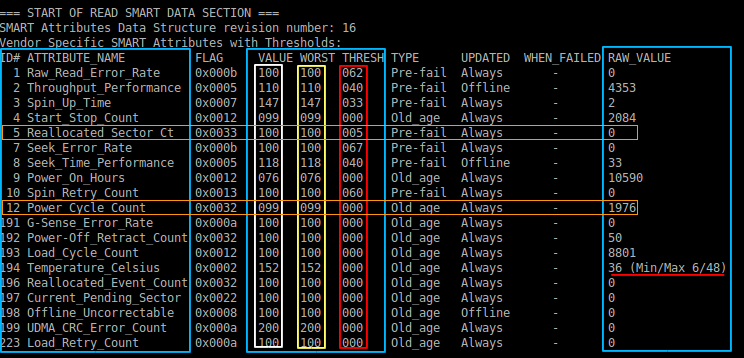
SMART Attributes 항목 설명:
- RAW_READ_Error_Rate: 디스크 표면이로부터 데이터를 읽는 과정에서 문제가 있을때 (주로 물리적인 충격을 받을때 유발됩니다)
- Spin_Up_Time: 플레터 회전이 제로 rpm 에서 최대 RPM에 도달하는데 걸리는 평균 시간
- Start_Stop_Count: 플레터가 회전하고 정지한 횟수
- Reallocated_Sector_Ct: 섹터에 문제가 생겨서 스페어영역의 섹터로 대체한 횟수
- Seek_error_Rate: 탐색 오류율
- Power_On_Hours: 하드에 전원이 인가된 시간
- Spin_Retry_Count: 최대 RPM에 도달하기 위해서 회전을 시도하는 횟수(정상이라면 1번에 끝나야합니다)
- Power_Cycle_Count: 전원 On/off 횟수
- Power-Off_Retract_Count: 헤드가 플레터(디스크)에서 벗어나는 횟수(간단하게 parking 위치로 이동한 횟수)
- Load_Cycle_Count: 헤드가 플레터위로 진입한 횟수
- Temperature_Celsius: 하드 디스크 온도
- Reallocated_Event_Count: 스페어 영역으로 대체된 섹터로 부터 데이터를 읽어간 횟수
- hardware ecc recovered: ECC오류 검출로 인하여 복구된 횟수
- Current_pending_Sector: 불안정적인 섹터로 스페어영역 섹터로 remap을 준비중이거나 읽는 과정에 문제가 생긴 섹터 ( 준 배드섹터)
- Offline_Uncorrectable: 읽기/쓰기에 문제가 생긴 섹터, 즉 디스크 표면이 손상됨(베드섹터)
- UDMA_CRC_Error_Count: 하드디스크 인터페이스를 통해 데이터 전송과정에 발생한 CRC 오류 횟수
- Multi_Zone_error_Rate: 섹터에 쓰기과정에 발생한 에러가 검출된 횟수
3. smartmontools 매뉴얼 확인
매뉴얼: http://linux.die.net/man/8/smartctl
[root@localhost ~]# man smartctl
4. smartmontools을 이용한 델서버 디스크 상태점검
smartmontools 5.3.X 이하 버전에서는 DELL megaraid_sas 를 지원하지 않아 DELL 서버는 smartctl 을 확인 할수 없었는데 smartmontools 5.42 버전이상에서는 Dell megaraid_sas 지원하여 아래와 같이 명령어를 통해서 RAID 상태및 디스크 상태를 확인할수 있습니다
Dell 장비의 경우 델에서 제공하는 오픈매니저툴(GUI기반) 툴을 이용하여 전체 서버상태를 확인하실수 있습니다
Dell 오픈매니저: http://linux.dell.com/repo/hardware/omsa.html
megaraid 지원:
megaraid,N  -  [Linux  only]  the device consists of one or more SCSI/SAS disks connected to a MegaRAID controller.
              The non-negative integer N (in the range of 0 to 127 inclusive) denotes which disk on the controller is  monitored.
              Use syntax such as:
              smartctl -a -d megaraid,2 /dev/sda
              smartctl -a -d megaraid,0 /dev/sdb
              This interface will also work for Dell PERC controllers.  The following /dev/XXX entry must exist:
              For PERC2/3/4 controllers: /dev/megadev0
              For PERC5/6 controllers: /dev/megaraid_sas_ioctl_node
1) smartctl -s on -a -d sat+megaraid,0 /dev/sda
-d TYPE, --device=TYPE
-s VALUE, --smart=VALUE
       Enables  or disables SMART on device.  The valid arguments to this option are on and off.
-a, --all
       Prints  all  SMART  information  about the disk, or TapeAlert information about the tape drive or changer.  For ATA
       devices this is equivalent to
2) smartctl -s on -A -d sat+megaraid,0 /dev/sda
-A, --attributes
       [ATA] Prints only the vendor specific SMART Attributes
3) SSD 디스크의 경우
smartctl -s on -A -d sat+megaraid,5 /dev/sda
문제가 해결되지 않았나요?
궁금하신 사항은 언제든지 1:1 문의게시판으로 문의해 주세요.
문의 시 포함 정보:
- 카페24 아이디
- 서비스 ID: 서버호스팅 서비스 ID
- 서버 OS: CentOS / Ubuntu 등
- 디스크 타입: SATA / SAS / SSD
- smartctl 출력: smartctl 명령 실행 결과
- 문의 내용: 디스크 상태 점검 관련 문의 사항